

Favicon Guide: Which Sizes and Files Do You Need?
The favicon files, sizes and HTML a website needs to look right in browser tabs, on home screens and in search results.
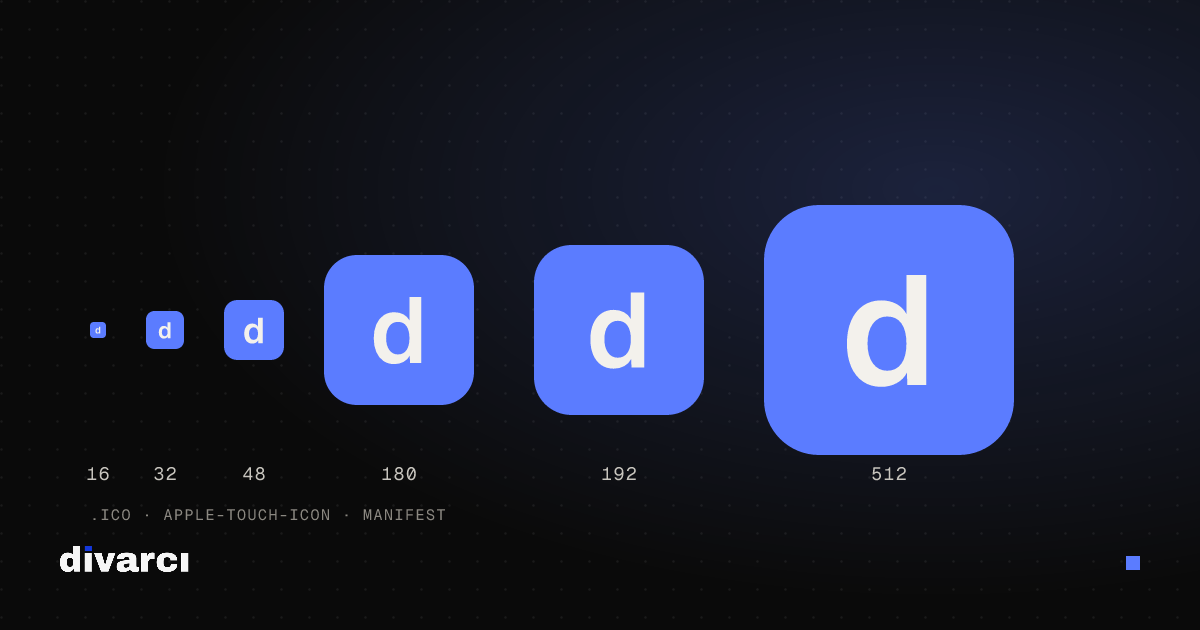
A favicon is the small icon shown in browser tabs, in bookmarks and next to your site's name in some search results. When someone adds your site to a phone's home screen, a larger version of the same icon is used. A missing or blurry favicon makes a site look unfinished at first glance.
Files you need
| File | Size | Used for |
|---|---|---|
| favicon.ico | 16, 32 and 48 px (in one file) | Browser tabs, bookmarks, older browsers |
| PNG favicon | 32 × 32 px (optionally 16 × 16) | Current browsers |
| apple-touch-icon.png | 180 × 180 px | iPhone and iPad home screen |
| Android icons | 192 × 192 and 512 × 512 px | Android home screen, site.webmanifest |
| site.webmanifest | — | Icon and color info for Android and home-screen sites |
HTML
After uploading the files to your site's root, add lines like these to the <head> of your pages:
<link rel="icon" href="/favicon.ico" sizes="48x48"><link rel="icon" href="/favicon-32.png" type="image/png" sizes="32x32"><link rel="apple-touch-icon" href="/apple-touch-icon.png"><link rel="manifest" href="/site.webmanifest">
Designing an icon that reads at small sizes
- Simplify: 16 pixels is tiny; use the symbol or initial instead of the full logo.
- Avoid thin lines: Thin strokes and small text disappear at small sizes.
- Keep contrast high: Pick a background color that works in both light and dark browser themes. An icon with a transparent background can vanish in dark mode.
- Work square: Prepare a square source image of at least 512 × 512 pixels; the small sizes are made from it.
- Leave margins on the Apple icon: iOS rounds the corners automatically, so keep important elements away from the edges.
If the change doesn't show up
Browsers cache favicons for a long time. If you still see the old icon after uploading a new one, hard-refresh the page or clear the browser cache. The icon in search results updates only after the search engine recrawls your site, which can take a while.
To create all of these files, the manifest and the HTML in one ZIP, use the Favicon Generator; start from an image or a few letters.
More posts
Optimizing Images for Websites: A Guide to Faster Pages
Prepare your website images with the right size, format and compression so pages load faster and perform better in search.
How to Remove a Photo Background: A Practical Guide to Transparent PNGs
Shooting tips for clean background removal, edge settings, manual touch-ups and saving a transparent image in the right format.
Putting Documents into One PDF: Photos to PDF, Merging and Splitting
Turning documents photographed with a phone into a PDF, merging several PDFs and removing pages you don't need, for applications, email or archiving.